Education Solution

University Attendance Tracking Made Simple

Transform lecture attendance with barcode scanning - no expensive hardware, no buddy sign-ins, no manual roll call.

7-Day Free Trial No Credit Card Required iOS & iPadOS
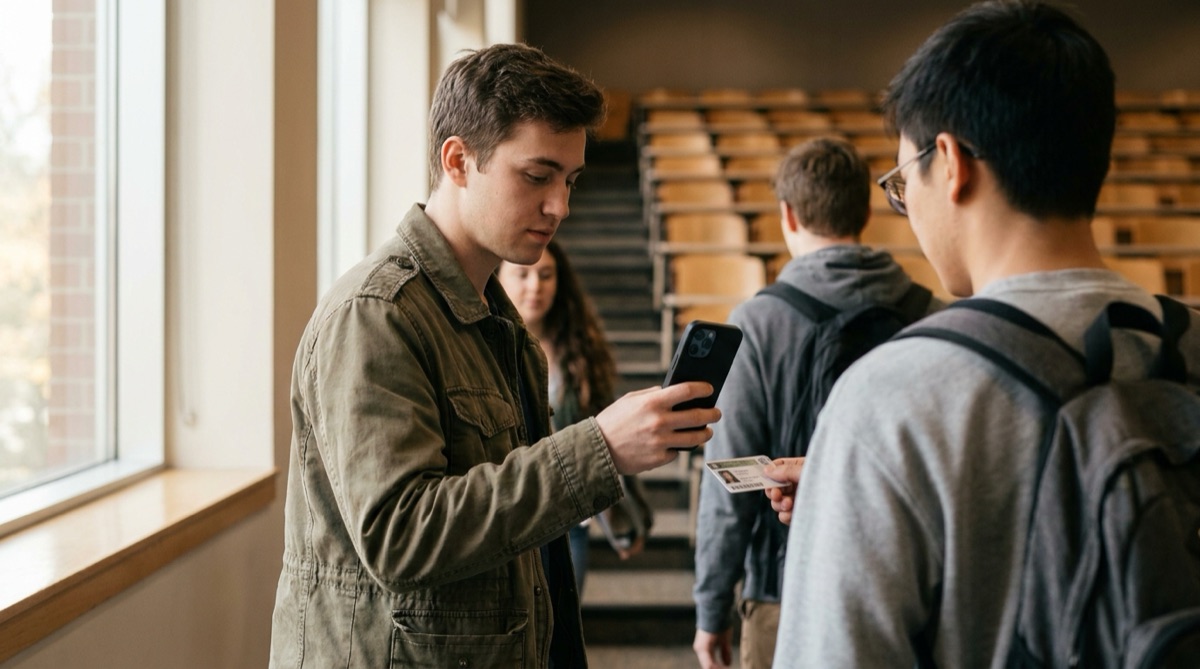
Professor using iPad to scan student IDs for attendance tracking in university lecture hall

Why University Professors Struggle With Attendance Tracking

For professors teaching large lecture courses with 100-300 students, taking attendance is nearly impossible. Traditional roll call wastes valuable lecture time - calling 200 names takes 15-20 minutes every class. That's over 7 hours of lost instructional time per semester.

Paper sign-in sheets create their own problems. Students sign for absent friends, creating inaccurate records that defeat the purpose of tracking attendance. Sheets get lost or damaged, and illegible handwriting makes it difficult to identify who actually attended.

Manual entry of attendance data into university systems adds another layer of frustration. Hours spent transcribing paper records, only to discover missing signatures or unclear names that require follow-up investigation.

Meanwhile, universities require accurate attendance data for compliance, funding, and identifying at-risk students. When attendance tracking is this difficult, professors often give up entirely or use imprecise methods that don't serve anyone well.

How DataScan Solves University Attendance Tracking

DataScan turns any iPhone or iPad into a professional attendance tracking system. Students scan their university ID cards as they enter the lecture hall - the same ID cards they already carry. No expensive dedicated hardware, no special equipment to purchase or maintain.

DataScan's Continuous Scan mode handles high-volume check-ins effortlessly. A teaching assistant positioned at the door can scan 2-3 students per second. For a 200-student lecture, complete check-in happens in just 6-8 minutes before class starts, with no disruption to the lecture itself.

Every scan is timestamped, creating a reliable audit trail. Students who arrive late are automatically flagged by their scan time. There's no way to sign in for an absent friend - each student must physically present their own ID card to be scanned.

Export attendance to Excel with a single tap, ready for immediate import into your university's management system. The exported file includes student ID numbers, timestamps, and dates - formatted exactly how your system needs it. No manual transcription, no data entry errors, no hours spent updating records.

How It Works: The Simple 5-Minute Workflow

  1. Position at Entrance Teaching assistant or professor positions themselves at the lecture hall entrance with iPad or iPhone running DataScan. Start Continuous Scan mode before students arrive.
  2. Students Scan IDs As students arrive, they briefly show their university ID card to be scanned. Each scan takes 1-2 seconds. The app displays the student ID number on screen for visual confirmation.
  3. Lecture Begins Complete 200-student check-in in 6-8 minutes. Late arrivals can still scan after class starts - their late timestamp is automatically recorded. Stop scanning when lecture ends.
  4. Export Attendance Tap the export button to generate an Excel file containing all student IDs and timestamps. The file is immediately available to email or save to cloud storage.
  5. Import to University System Import the Excel file into your university's student management system (Banner, Colleague, etc.). The system matches student IDs to names and updates attendance records automatically.

Biology 101 at Valley State University: A Real Example

Dr. Sarah Chen teaches Biology 101, an introductory course required for all life science majors. Her lectures are held three times per week in a 250-seat auditorium, with 180 enrolled students. State regulations require attendance tracking for funding compliance, but manual methods were consuming too much time.

Before DataScan, Dr. Chen passed around paper sign-in sheets. Students in the back rows often didn't receive the sheet until 15 minutes into the lecture. Buddy signing was rampant - she suspected at least 20-30 signatures per class were fraudulent. Collecting and filing the sheets, then manually entering attendance data took her graduate assistant 3-4 hours every week.

Now, her teaching assistant Meera arrives 10 minutes early and sets up an iPad at the auditorium entrance. As students flow in for the 9:00 AM lecture, they scan their IDs in 2-3 seconds each. By 9:00 AM, 174 students have checked in. Six late arrivals scan between 9:05-9:15, automatically marked as late by their timestamps.

After the 9:50 AM lecture ends, Meera exports the attendance file. It takes 10 seconds. The file shows 180 unique student IDs with exact arrival times. During her office hours, Meera imports the file into Banner - the university's student management system - which automatically updates all attendance records and emails absent students a reminder about the attendance policy.

Results have been transformative. No lecture time is wasted on roll call. Buddy sign-ins have been completely eliminated - you can't scan someone else's physical ID card from across the room. Students who are struggling with attendance are identified immediately, allowing early intervention. And Dr. Chen's teaching assistant saves 3 hours every week that can now be spent helping students understand course material.

The Numbers: Before and After

Before DataScan: 15 minutes per class wasted on attendance, 3-4 hours/week for data entry, estimated 20% fraudulent signatures. After DataScan: 6-8 minutes pre-class check-in (no lecture time lost), 10 minutes/week for exports and imports, 0% fraudulent attendance. Time saved: 6+ hours per week.

Measured Results After One Semester

  • 90% reduction in time spent on attendance tracking (from 7+ hours/week to 30 minutes/week)
  • 100% elimination of buddy sign-ins and fraudulent attendance records
  • Early identification of 12 at-risk students based on attendance patterns, leading to intervention
  • Zero attendance data entry errors (previously 5-8 errors per week requiring correction)
  • Complete compliance documentation ready for state funding audits
  • Professor satisfaction increased - more time for teaching, less time on administration

Everything You Need for University Attendance

Rapid Continuous Scanning

Scan 60+ students per minute with Continuous Scan mode. No button presses, no delays - just show the ID and move on. Perfect for high-volume check-ins.

Automatic Timestamps

Every scan records the exact date and time. Identify late arrivals automatically without manual tracking. Complete audit trail for compliance.

Excel Export to University Systems

One-tap export generates Excel files formatted for Banner, Colleague, or any university management system. Import attendance data in seconds.

Works Completely Offline

No internet connection required during scanning. Perfect for lecture halls with poor connectivity. Sync and export when you're back online.

Duplicate Detection

Automatically flags if the same ID is scanned twice. Prevents accidental double-scanning while allowing legitimate correction of mistakes.

No Special Hardware Required

Use any iPhone or iPad you already own. No expensive dedicated scanners, no ongoing hardware costs. Download the app and start immediately.

Get Started in 5 Minutes

  1. Download DataScan Download DataScan from the App Store on your iPhone or iPad. Start the 7-day free trial - no credit card required.
  2. Select Continuous Scan Mode Open the app and tap "Continuous Scan" on the main menu. This mode is specifically designed for high-volume scanning like attendance.
  3. Scan Student IDs Position your device at the entrance and have students show their university ID cards. The app scans barcodes instantly - no training needed.
  4. Export Attendance After class, tap the list icon to view all scans, then tap the export button. Choose Excel format and email the file to yourself.
  5. Import to Your System Open the Excel file and import it into your university's student management system. That's it - attendance is recorded.

Ready to Transform Your Lecture Attendance?

Join professors at universities worldwide who have eliminated manual attendance tracking. Start your free 7-day trial today.

7-Day Free Trial • No Credit Card Required • Cancel Anytime