Laboratory & Research

Complete Chain of Custody for Laboratory Samples

Batch tracking and compliance-ready audit trails. Eliminate sample mix-ups and maintain perfect documentation.

7-Day Free Trial No Credit Card Required iOS & iPadOS
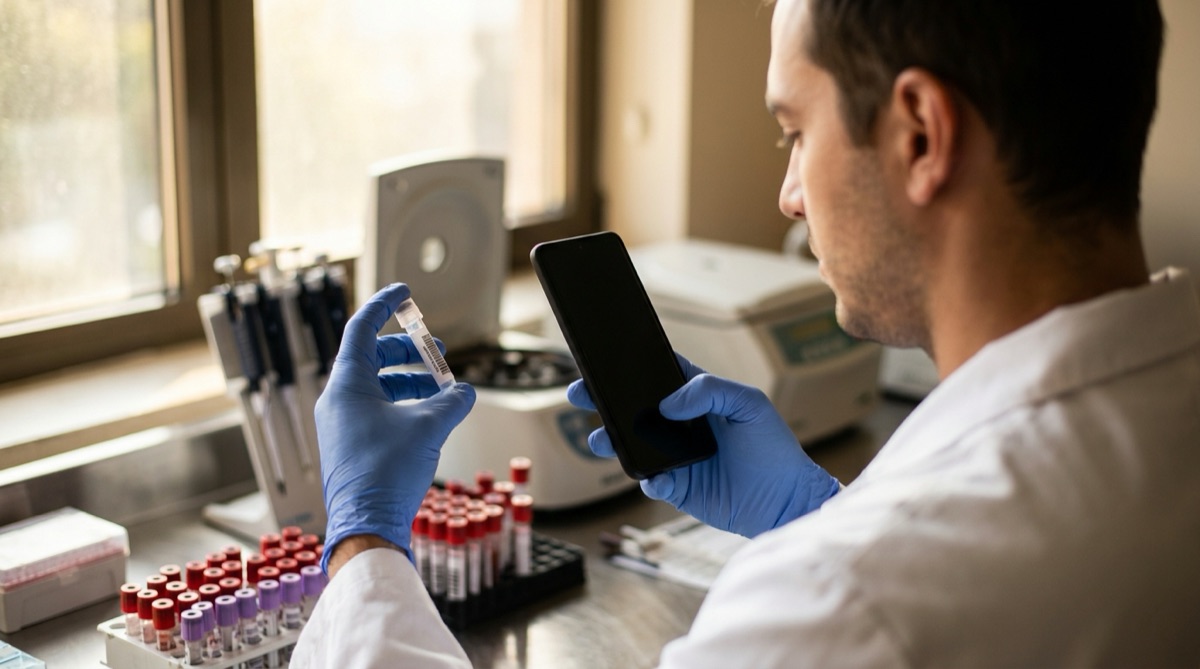
Lab technician scanning sample barcode for chain of custody tracking

Why Laboratories Struggle With Sample Tracking

Laboratory sample tracking requires perfect accuracy under time pressure. You receive 50 samples from a clinical trial. Each sample needs a unique ID, documentation of who collected it, when, and from which subject. The samples split into multiple aliquots for different tests. Each aliquot needs tracking through storage, testing, and disposal. Track this on paper lab notebooks and you're risking transcription errors, lost documentation, and catastrophic sample mix-ups that invalidate months of work.

Chain of custody requirements are strict for good reason. You must document every time a sample is handled: who accessed it, when, why, and what was done. Paper-based chain of custody forms get separated from samples. Someone forgets to sign the form. The timestamp is illegible. The sample location isn't recorded. When an auditor asks to see the complete chain of custody for Sample X, you're piecing together information from lab notebooks, sign-out sheets, and people's memories. The documentation is incomplete and the audit findings are negative.

Sample mix-ups are every lab's nightmare. Two samples with similar IDs sit next to each other. A researcher grabs the wrong one. Or labels a tube incorrectly. Or transposes digits while manually recording a sample ID. The error isn't discovered until results don't make sense - if it's discovered at all. In clinical or forensic labs, sample mix-ups can have catastrophic consequences: wrong diagnoses, invalidated legal evidence, months of research wasted. But preventing mix-ups with manual tracking is nearly impossible when handling hundreds of samples.

Batch processing creates documentation nightmares. You run 96 samples through an assay. Each sample needs its result recorded and linked back to the original sample ID. With manual transcription, you're writing 96 sample IDs and 96 results, hoping you don't transpose any digits or skip any rows. The process takes 30-45 minutes and errors are common. Later, someone needs to trace results back to original subjects - requiring you to search through notebooks matching sample IDs to subject IDs to results. The process is slow, error-prone, and auditors hate it.

How DataScan Creates Perfect Sample Documentation

DataScan eliminates manual transcription by scanning sample barcode labels instead of writing IDs. Receive a batch of samples? Scan each sample's barcode in Multiple Value Scan mode. The app captures the exact ID with zero transcription errors, and you add the metadata as notes: collection date, subject ID, sample type, collector name. The data captures in seconds per sample - faster than writing in a lab notebook and perfectly accurate. Export to Excel and you have complete receiving documentation with timestamps and GPS location.

Chain of custody becomes automatic and complete. Every time someone accesses a sample, they scan its barcode in Multiple Value Scan mode and record what they're doing as a note: 'Retrieved for testing', 'Aliquoted', 'Tested', 'Returned to storage', 'Disposed'. The app captures timestamp, GPS location (which lab or storage area), and who made the scan. Export a sample's history and you have perfect chain of custody documentation: every access, every handler, every location, all timestamped and GPS-tagged. Auditors love it because the documentation is complete and verifiable.

Batch processing becomes fast and error-free. You have 96 samples to test? Scan all 96 barcodes in 3-4 minutes. The app records the exact sample ID sequence. Export to Excel, run your assay, and enter results next to the exported IDs in the same sequence - each result lines up with the correct sample for a perfect sample-to-result mapping. What used to take 30-45 minutes with transcription errors now takes 5 minutes with zero errors. Results trace back to original sample IDs perfectly.

Sample mix-ups become virtually impossible. Import your sample list and scan each sample's barcode in Lookup Scan mode before testing. The app shows you the sample's metadata: subject ID, sample type, collection date. Verify you have the correct sample before proceeding. If you grab the wrong sample by mistake, the scan immediately shows the wrong metadata and you catch the error. The barcode doesn't lie. This simple verification step eliminates the sample mix-ups that plague manual tracking systems.

How It Works: The 5-Second Sample Scan

  1. Label Samples at Collection When collecting samples, apply barcode labels with unique sample IDs. Scan each sample in Multiple Value Scan mode and enter the metadata as notes: subject ID, collection date, sample type, collector. Takes 10-15 seconds per sample.
  2. Scan at Every Access Whenever someone handles a sample, they scan the barcode in Multiple Value Scan mode and record the action as a note: retrieved, aliquoted, tested, stored, disposed. The app captures timestamp and GPS automatically. Perfect chain of custody.
  3. Batch Scanning for Testing Before running a batch test, scan all samples in sequence. The app records the exact order. Enter results in the same sequence. Export links each result to the correct sample ID automatically.
  4. Verify Before Testing Before testing a sample, scan its barcode in Lookup Scan mode to view its metadata from your imported sample list. Verify you have the correct sample by checking subject ID and sample type. Catch mix-ups before they happen.
  5. Export Complete Documentation Export sample data to Excel for analysis or compliance. Complete chain of custody, all accesses timestamped and GPS-tagged, perfect sample-to-result linkage. Audit-ready documentation.

Precision Diagnostics Laboratory: A Real Example

Precision Diagnostics operates a clinical testing laboratory in Atlanta processing 200-400 patient samples daily across multiple test types. Each sample arrives with a requisition form, gets logged into their LIMS, is aliquoted into multiple tubes for different tests, and is tracked through various testing platforms. Before DataScan, all sample handling was documented manually: lab technicians wrote sample IDs in notebooks when retrieving samples, wrote them again on batch sheets when testing, and manually entered results into the LIMS by typing sample IDs and linking them to results.

Before DataScan, sample mix-ups occurred 2-3 times per month. Usually the error was caught during result review (results didn't match patient history), requiring sample re-collection and re-testing. Twice in one year, mix-ups weren't caught until patients questioned results, leading to medical errors and significant liability concerns. Chain of custody documentation was incomplete - lab notebooks had entries but timestamps were approximate, signatures were sometimes missing, and tracking a specific sample's complete history required searching multiple notebooks and asking staff about their memories.

They implemented DataScan for all sample handling at a cost of $400/year (eight iPhones, one for each testing area). Sample barcodes already existed in their system (LIMS printed barcode labels). They started using DataScan for sample verification: before retrieving a sample from storage, scan the barcode to verify correct sample. Before aliquoting, scan to verify. Before testing, scan to verify. Before entering results, scan to link results to correct sample. Every scan created a timestamped chain of custody entry.

Sample mix-ups dropped to zero over the first 6 months. The verification step of scanning before every action meant technicians caught errors immediately: scan shows Subject 12345 when you expected Subject 12346 - stop, you have the wrong sample. Batch processing became dramatically faster and more accurate. Before testing 96 samples, technicians scan all 96 barcodes (takes 4 minutes). The app records the exact sequence. After testing, they enter the 96 results next to the exported ID sequence in Excel - a perfect sample-to-result mapping that imports directly into LIMS. What used to take 45 minutes of manual transcription now takes 8 minutes of scanning and result entry with zero transcription errors.

During a CAP inspection, auditors requested complete chain of custody documentation for 10 randomly selected samples. The lab manager exported DataScan data for those samples and provided complete histories showing: initial receipt timestamp and who logged it, every time the sample was retrieved from storage, every aliquot creation, every test performed, all results, and final disposal - all timestamped and GPS-tagged proving which lab area each action occurred in. The documentation was so complete that auditors used it as a positive example in their report. Documentation that would have been impossible to compile with manual notebooks was generated in 5 minutes by exporting and filtering Excel data.

The Numbers: Before and After

Before DataScan: 2-3 sample mix-ups monthly, 45 minutes batch processing time, incomplete chain of custody documentation, approximate timestamps. After DataScan: Zero mix-ups in 6 months, 8 minutes batch processing time, complete chain of custody with GPS and exact timestamps. CAP inspection: zero chain of custody findings (vs 3 findings previous inspection).

Measured Results After 12 Months

  • Sample mix-ups reduced from 2-3 monthly to zero in 6 months (100% elimination)
  • Batch processing time reduced from 45 minutes to 8 minutes (82% reduction)
  • Chain of custody documentation complete for 100% of samples vs ~60% with manual notebooks
  • CAP inspection results: zero chain of custody findings vs 3 findings in previous inspection
  • Time savings: 150+ hours annually no longer spent on manual transcription and documentation
  • Prevented potential liability: zero sample mix-ups mean zero medical errors from lab mistakes

Everything You Need for Laboratory Sample Tracking

Barcode-Based Sample ID

Scan sample barcodes instead of manually transcribing IDs. Eliminates transcription errors. Works with any barcode format including standard lab labels.

Complete Chain of Custody

Every Multiple Value scan creates a timestamped record with action notes and GPS location. Track every access, every handler, every action. Export complete audit-ready chain of custody documentation.

Batch Processing

Scan dozens or hundreds of samples in minutes. Record exact sequence. Enter results in same sequence. Automatic sample-to-result linking with zero transcription errors.

Sample Verification

Import your sample list and scan in Lookup Scan mode before handling - the metadata appears instantly so you verify you have the correct sample. Simple verification step eliminates the most dangerous lab errors.

Metadata Tracking

Associate any metadata with samples: subject IDs, collection dates, sample types, storage locations, test types. Scan to access or update metadata instantly.

Compliance Documentation

Export complete sample histories for regulatory compliance, audits, or investigations. All data timestamped, GPS-tagged, and linked to specific users. Perfect audit trails.

Get Started in One Morning

  1. Download DataScan Download DataScan to iPhones or iPads used in your lab. Start the free 7-day trial - no credit card required. Works with existing barcode labels from your LIMS.
  2. Define Sample Workflow Identify key sample handling points where you want documentation: receipt, storage retrieval, aliquoting, testing, disposal. These are your scan points for chain of custody.
  3. Train Lab Staff Show staff how to scan samples and record actions. It takes 60 seconds to learn. Emphasize the verification step: scan before handling to verify correct sample and catch mix-ups.
  4. Start with One Test Type Begin using DataScan for one type of test or one area of your lab. Verify the workflow works correctly. Export data and confirm it integrates with your LIMS or analysis process.
  5. Roll Out Lab-Wide Expand to all sample types and all testing areas. Export data daily or weekly. Use the documentation for audits, investigations, or quality control reviews.

Ready to Eliminate Sample Mix-Ups?

Join laboratories with zero sample mix-ups and complete chain of custody documentation. Start your free 7-day trial today.

7-Day Free Trial • No Credit Card Required • Cancel Anytime