Specialty Food Production

Know Where Every Cheese Wheel Is, Through Every Stage of Aging

Moving wheels between ripening sections? Scan the new location once, then scan every wheel that goes there. Complete location history for every batch — even in caves with no signal.

7-Day Free Trial No Credit Card Required iOS & iPadOS
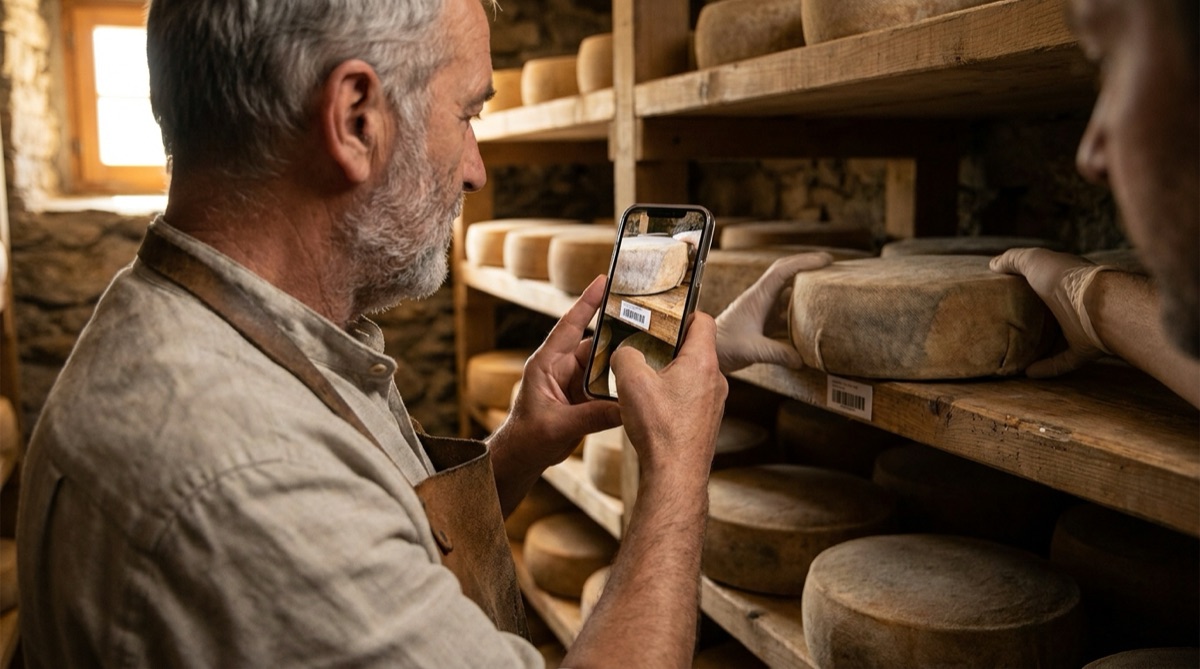
Cheesemaker scanning a ripening section barcode before scanning cheese wheels into the new location

Why Cheesemakers Lose Track of Wheels During Aging

Artisan cheese doesn't sit still while it ages. Wheels start in a high-humidity ripening section, move to a drier zone after the rind sets, and often move again for final affinage. A creamery with a few hundred wheels across multiple cave sections is running a small warehouse — except the inventory is alive, the moves happen weekly, and the rooms are cold, damp, and often without cell signal.

Paper records fail exactly where cheese is made. Clipboards hung on racks soak up cave moisture. Workers with wet hands abbreviate notes that nobody can read three months later. 'Moved 8/15' — which wheels? To which section? When a move involves forty wheels shifting from Section B to Section D, writing down every wheel number by hand takes longer than the move itself, so it simply doesn't happen.

The result is that nobody can answer two basic questions quickly: 'Where is batch 2024-087 right now?' and 'What exactly is sitting in Section D?' Finding a specific batch means walking the caves and reading labels. Harvest planning means trusting memory. And when a milk-quality issue means you must locate every wheel from one production week, the search takes hours.

Food safety regulations make this more than an inconvenience. Traceability rules require you to know where product from any production date is located — quickly. If your location records live on moisture-damaged clipboards and in the heads of experienced staff, a routine audit or a recall inquiry turns into days of reconstruction work.

One Scan for the Location, One Scan per Wheel

DataScan's One-to-Many scan mode was built for exactly this movement pattern. Give every ripening section a location barcode on the shelf, and every wheel or batch a barcode label. When wheels move, open One-to-Many mode and scan the destination section's barcode once — then scan each wheel as you place it. Every wheel is now linked to that location, with a timestamp, in one continuous scanning flow.

A move that used to mean scribbling forty wheel numbers on a damp clipboard becomes: scan the shelf, then scan wheels as fast as you can rack them. There is no typing in the cave. The app works completely offline, so zero cell signal behind a meter of stone doesn't matter — everything is stored on the phone and exported later from the office.

Back at a desk, export the session to Excel or CSV. Each row shows the location barcode, the wheel that was scanned into it, and the timestamp. The most recent scan for any wheel is its current location. A simple filter answers 'where is batch 2024-087?'; a pivot table answers 'what is in Section D right now?' — and the full history shows every section each wheel has passed through, with dates.

That same export is your traceability documentation. If milk from one farm on one production date is questioned, filter your records for those batch numbers and you have every affected wheel's current section in minutes, plus the complete movement history behind it. No cave walking, no clipboard archaeology — a spreadsheet filter.

How It Works: Moving Wheels With One-to-Many Scanning

  1. Label Sections and Wheels Print a barcode label for each ripening section or shelf (SECTION-A, SECTION-B, ...) and label each wheel or batch with its ID (2024-087). Simple Code 128 or QR labels from any label printer work.
  2. Scan the Destination Section When wheels move, open DataScan's One-to-Many mode and scan the barcode of the section they're moving TO. This becomes the container for everything scanned next.
  3. Scan Each Wheel Into Place Scan every wheel as you set it on the shelf. Each scan links that wheel to the section with a timestamp. Racking and recording happen in the same motion — no writing, no typing.
  4. Repeat Per Section, Then Export Moving wheels to several sections? Scan the next section barcode and keep going. Back at the office, export the session to Excel or CSV — every row is location, wheel, timestamp.
  5. Look Up Anything in Seconds Filter by wheel ID to see its current section and full movement history. Pivot by section to see exactly what's aging where. Use the same export for harvest planning and traceability audits.

Mountain Valley Creamery: A Real Example

Mountain Valley Creamery in Vermont produces artisan cave-aged cheeses — 30-40 batches per month across 6 varieties, with aging from 60 days to 18 months. At any moment, 400-600 wheels sit across two cave facilities divided into 14 ripening sections with different temperature and humidity profiles. Every wheel moves at least twice during its life: from the fresh room to high-humidity ripening, then to a drier finishing section.

Before DataScan, moves were recorded on clipboards hung at each section — when they were recorded at all. A Tuesday move of forty Alpine-style wheels from Section B to Section D meant either writing forty wheel numbers with cold, wet hands or writing 'B→D, ~40 wheels, 8/15' and hoping. Finding the wheels from one production week for a quality check meant walking both caves reading rind labels: 4-6 hours.

Now every section shelf carries a laminated barcode and every wheel gets a batch label at production. On move day, the cave worker scans SECTION-D once, then scans each wheel as it's racked. Forty wheels take about four minutes — barely slower than moving them unrecorded. The phone works offline in both caves; the worker exports the session from the office Wi-Fi afterwards.

The weekly export goes into the creamery's master spreadsheet. A pivot by section shows exactly what's aging where; a filter by batch shows each wheel's complete path through the caves with dates. Harvest planning now starts from the spreadsheet — which batches are in the finishing sections, and how long they've been there — instead of from memory.

When a milk supplier flagged a quality concern for one delivery date, the production manager filtered the movement records for the three affected batches and had every wheel's current section — 23 wheels across both caves — in under five minutes, with the complete location history to show the inspector.

The Numbers: Before and After

Before DataScan: moves recorded on damp clipboards or not at all, 4-6 hours to locate all wheels from one production week, harvest planning from memory. After DataScan: every move captured with one section scan plus one scan per wheel, any batch located with a spreadsheet filter in minutes, complete movement history per wheel, records that survive the cave.

Measured Results After 12 Months

  • Time to locate all wheels from one production week: 4-6 hours of cave walking down to minutes of spreadsheet filtering
  • Recording a 40-wheel section move: about 4 minutes of scanning instead of unreliable clipboard notes
  • Every wheel now has a complete, timestamped movement history through the caves
  • Harvest planning driven by section contents and aging time from the weekly export
  • Zero moisture-damaged or illegible records — the caves can't destroy digital data
  • Traceability inquiry answered for the inspector in minutes, with full location history

Everything You Need to Track Wheels Through Aging

One-to-Many Location Scanning

Scan a section barcode once, then scan every wheel placed there. Purpose-built for moving groups of items into a location — exactly what cave moves are.

Complete Movement History

Every scan is timestamped. Exports show each wheel's full path through your ripening sections, from fresh room to finishing shelf to harvest.

Works Offline in Caves

Stone walls and cellars kill cell signal. DataScan works completely offline — scan everything underground, export later when you're back on Wi-Fi.

Excel & CSV Export

Every session exports as a clean spreadsheet: location, wheel, timestamp. Filter to find a batch, pivot to see a section's contents, archive for compliance.

Traceability in Minutes

Filter your movement records by batch number and you have every affected wheel's current section and full history — recall-ready documentation without cave walking.

Notes When You Need Them

Switch to Multiple Value mode to record an observation against a single wheel — a quality note with timestamp and GPS — alongside your location tracking.

Get Started in One Afternoon

  1. Label Your Sections Print one barcode label per ripening section or shelf (SECTION-A, SECTION-B, ...). Laminate them — they live in a damp cave. Any Code 128 or QR label works.
  2. Label Wheels at Production Keep your existing batch numbering (2024-001, 2024-002, ...) and print a barcode label per wheel or batch. Labeling becomes part of the make-day routine.
  3. Download DataScan Install DataScan on the iPhones used in production and the caves. Start the free 7-day trial — no credit card required. Offline scanning works out of the box.
  4. Run a First Census Walk each section once: scan the section barcode, then scan every wheel on it. In an afternoon you have a complete, current map of both caves.
  5. Make It the Move Procedure From now on, every move is: scan the destination section, scan the wheels going there. Export weekly and keep the master spreadsheet current.

Ready to Know Where Every Wheel Is?

Track every cheese wheel through every ripening section with one scan per move. Start your free 7-day trial today.

7-Day Free Trial • No Credit Card Required • Cancel Anytime