How to Verify Barcode Scans Against a Product Database
To verify barcode scans against a product database, import your master list as a CSV into a scanning app that checks each scan locally. DataScan's Lookup Scan mode does exactly this: a scanned barcode that exists in your imported list shows its record instantly; one that doesn't finds no match on the spot. The whole check runs on the phone, offline. Lookup Scan itself records nothing; for a results file, scan in Continuous Scan with the lookup columns added to the export.
The question every scan should answer
Most scanning tells you what a barcode says. Verification answers the more useful question: is this what it should be? Is this item on today's pick list? Is this the batch we are recalling? Is this book in our catalog, this part in our approved range, this shelf price the system price? The barcode alone can't say — only a comparison against your own master data can.
Doing that comparison by eye — scan, read the number, find it in a printout — is slow and fails exactly when it matters, on the one item in two hundred that doesn't belong. Putting the master list on the phone inverts the work: every scan checks itself, and only the exceptions ask for your attention.

Validate scans against a CSV master list: step by step
- Build the master list as a CSV Export barcode-plus-fields from wherever your truth lives — ERP, POS, asset register, or a plain spreadsheet. Include the fields that help at scan time: product name, price, batch or lot, bin location, supplier. Save it as a comma-separated CSV with the barcode in the first column and the data columns after it.
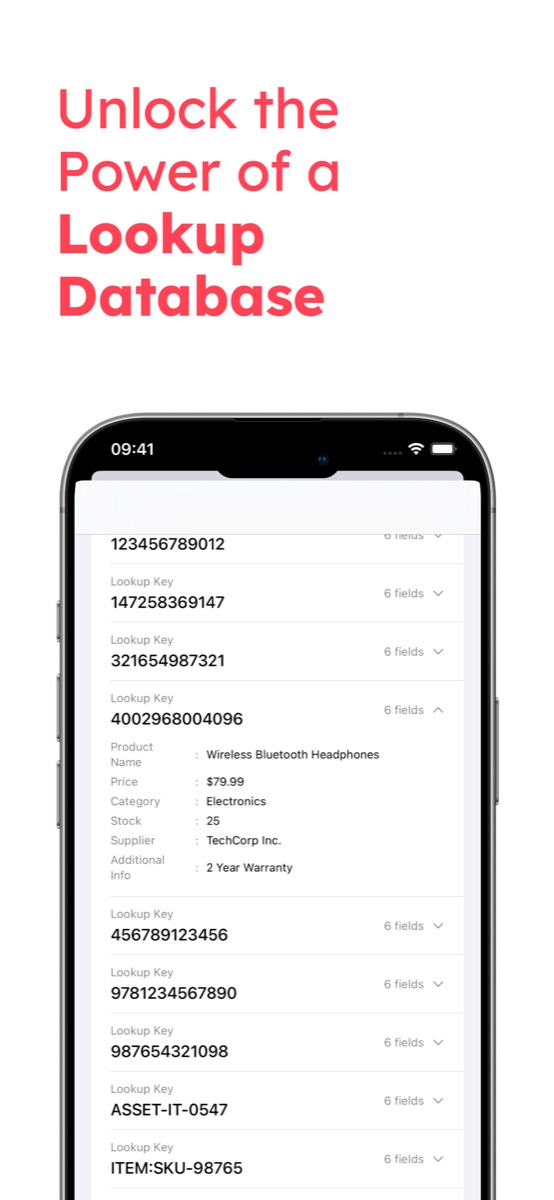
- Import the CSV into DataScan's Lookup database Load the file into the app. Each barcode becomes a lookup key carrying its fields — thousands of items are fine — and the whole database sits on the phone, which is why the check works in a cold room or a basement archive with no signal.
- Scan items in Lookup Scan mode Now scan anything. A barcode that exists in your list displays its record the moment the camera locks on — name, price, batch, whatever you imported. A barcode that is not in the list finds no match. That silence is the product: the mislabeled, misdelivered, or out-of-catalog item announces itself.
- Act on the no-matches Physically set the item aside — the golden rule of verification is that flagged items leave the flow immediately. Lookup Scan does not save the scan, so if you need a record, use the next step.
- Keep a record of the check Scan in Continuous Scan with Cross-reference with Lookup Data switched on, then export via email, SFTP, or the share sheet. Every row carries the matching fields from your list, and rows with empty lookup columns are the unmatched ones — your findings report, timestamped and ready to attach to a claim, a recall record, or a catalog correction.
- Refresh the database when master data changes The imported list is a snapshot, so re-export and re-import when prices change, batches ship, or products launch. Make it part of the routine: pull fresh data the morning of every verification job.
Getting the master CSV right
Verification is only as good as the keys, and two spreadsheet habits quietly corrupt them. First, Excel strips leading zeros from anything it thinks is a number — a UPC starting with 0 becomes an 11-digit value that will never match a scan. Keep the barcode column formatted as text, or edit the CSV in a tool that leaves it alone. Second, the key must be exactly what the phone reads: if the shelf carries EAN-13 codes, an internal article number in the barcode column matches nothing, and a UPC-A label is read as 13 digits with a leading 0 on iPhone and as 12 digits on Android, so list UPC codes in the form your phones read. Scan five real items and compare them with the file before trusting the import — a two-minute check that saves a hall full of false no-matches.
What teams verify with this
- Picking and dispatch checks. Import the order lines; a no-match at the pack bench is a mis-pick caught before the courier, not after the complaint. Pairs with the carton packing guide for the box-level record.
- Recall and batch pulls. Import the affected batch list and sweep the shelf: matches get pulled, and a Continuous Scan export with the lookup columns documents the sweep.
- Mislabeled and gray-market checks. A code that isn't in your catalog — or resolves to the wrong product — is the classic signature of relabeled or counterfeit-suspect stock. Instant no-match feedback makes spot audits practical.
- Price verification. Import current system prices and walk the aisles; the shelf label and the scanned price sit side by side on the screen.
- Goods-in against the PO. The receiving version of this workflow has its own guide — warehouse receiving with a phone scanner.
Example workflows: the laboratory sample tracking example shows each tube's sample details from an imported list while it is scanned into a freezer box, and the medical supply count example shows product names from a supply list during a stock count — both build on the same import-and-scan idea.
Other ways to validate scans
Honest alternatives: an ERP or WMS with live validation checks every scan against the system of record in real time — the right architecture when scans must post transactions instantly, at enterprise licensing cost and with connectivity as a hard dependency. Public barcode lookup apps tell you what a product is according to a global catalog, which is a different question from whether it is in your data. A printed list works for twenty items and collapses at two hundred. The import-a-CSV-and-scan approach covers the wide middle: your data, on your phone, offline, with a results file from Continuous Scan at the end — the same file-based philosophy as the ERP CSV import guide. See the DataScan overview for all five scan modes; Lookup is included in the 7-day free trial, so importing tonight's master list and verifying tomorrow's delivery costs nothing.
Frequently Asked Questions
You import a CSV of your master data — barcodes plus fields like name, price, or batch — into the app. When you scan an item, the app looks the barcode up in that imported list on the device: a hit shows the record instantly, a miss means the barcode is not in your data. It is validation against YOUR list, offline, not a lookup in some public product catalog.
Catalogs of thousands of items are the intended use. The list lives on the phone, lookups are instant, and no connectivity is involved. If your master data is huge, import the slice that matters for the task: today's pick list, one supplier's range, the recalled batch.
Yes — include the current price as a field in the imported CSV. Scanning a shelf item shows the system price next to the physical shelf label, which makes label-error walks and promotion-changeover checks a one-person, one-phone job.
Completely. The imported database and all scans are stored on the device, so match/no-match feedback works in basements, cold rooms, and field sites with zero signal. A connection is only needed to send an export or to refresh the imported list from a URL.