تطبيق العدّ الدوري: عمليات عدّ متدرّجة دون نظام WMS كامل
يتيح لك تطبيق العدّ الدوري التحقّق من شريحة صغيرة من المخزون وفق جدول زمني — امسح كل صنف، وأدخِل الكمية المعدودة، وصدّر القائمة — دون شراء نظام لإدارة المستودعات. ومع DataScan على هاتف iPhone أو Android، يلتقط وضع مسح قيمة واحدة صفوفًا تجمع الصنف مع الكمية، ويحوّلها جدول بيانات إلى تقارير فروقات مقابل مخزون نظامك. عدّ قصير كل أسبوع يكشف الفروقات بين عمليات الجرد الشاملة.
العدّ الدوري باختصار
بدلًا من عدّ كل شيء مرة واحدة سنويًا، يتحقّق العدّ الدوري من جزء صغير من المخزون بشكل مستمر: الممرّ 3 هذا الثلاثاء، ومثبّتات الفئة A الثلاثاء المقبل، والمخزون الموسمي قبل الموسم. وعلى مدى دورة كاملة، يُعدّ كل شيء — ومعظم الأصناف عدة مرات — وتظهر الأخطاء خلال أسابيع من حدوثها بدلًا من أحد عشر شهرًا لاحقًا. والعائد حقيقي: تبقى دقة السجلّات مرتفعة طوال السنة، ويُكتشَف الفاقد بينما الأثر لا يزال طازجًا، ولا تتوقّف عن العمل أبدًا لإجراء جرد شامل.
والسبب الذي يجعل معظم العمليات الصغيرة تتجاهله هو الأدوات. فمنصّات WMS للمؤسسات تولّد مهام العدّ تلقائيًا، لكنها تكلّف أكثر من المشكلة نفسها. والعمل بالحافظة والقلم ممكن، لكن نقل الأعداد الورقية إلى جدول بيانات يضاعف العمل بهدوء. والمسار الوسط هو الهاتف: التقاط سريع بالمسح، وتصدير منظَّم، وتسوية في جدول بيانات.
حدّد وتيرة: العدّ بأسلوب ABC دون استشاريين
يبدو تصنيف ABC أكثر فخامة مما هو عليه فعلًا. رتّب رموز SKU لديك حسب القيمة السنوية (أو هامش الربح، أو الأهمية الحرجة) وارسم خطّين:
- أصناف الفئة A — القلّة الحيوية، وهي عادةً نحو 20% من رموز SKU ونحو 80% من القيمة. اعدّها شهريًا، وأسبوعيًا إن استمرّت الفروقات بالظهور.
- أصناف الفئة B — الشريحة الوسطى. اعدّها ربع سنويًا.
- أصناف الفئة C — الذيل الطويل من المخزون الرخيص. اعدّها مرة أو مرتين في السنة، وغالبًا حسب الموقع لا حسب رمز SKU.
ثم ضع ذلك في التقويم كمهام صغيرة ومسمّاة — "الثلاثاء 8:00، الممرّ 3" — لأن عملية العدّ التي تستغرق 30 دقيقة تحدث فعلًا، أما التي تستغرق يومًا كاملًا فتُؤجَّل. هذه هي المنهجية بأكملها؛ فالانضباط أهمّ من الحسابات.
تنفيذ العدّ بهاتفك
- اختر شريحة اليوم من المخزون ممرّ واحد، أو رفّ واحد، أو فئة واحدة، أو الدفعة التالية من أصناف الفئة A من الجدول. فالشرائح الصغيرة تحافظ على دقة العدّ — لأن الانتباه يخفت أسرع من تعب الساقين.
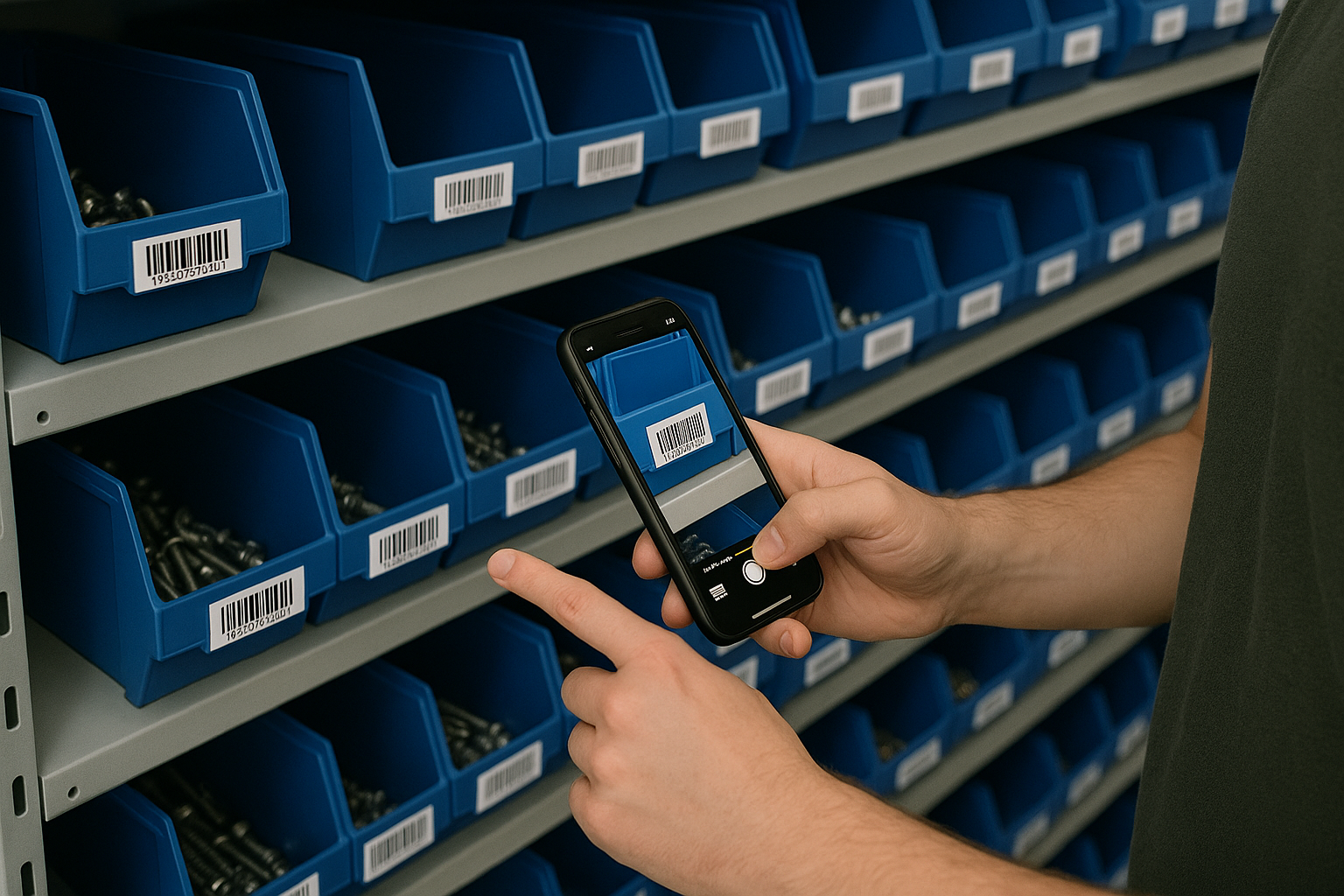
- ابدأ جلسة مسح بوضع مسح قيمة واحدة في DataScan، افتح مسح قيمة واحدة وابدأ مسحًا جديدًا للمنطقة؛ وصدّره قبل المنطقة التالية، بحيث يمثّل كل ملف منطقة واحدة (احفظه باسم aisle-03 2026-07-10). امسح باركود الصنف، وعُدّ ما هو موجود فعليًا على الرفّ، واكتب الكمية، وانتقل إلى الصنف التالي. ويصبح الإيقاع تلقائيًا خلال عشرة أصناف أو نحوها.
- صدّر نتيجة العدّ بصيغة CSV أو Excel أنهِ الجلسة وصدّرها: صفّ واحد لكل صنف مع الباركود والكمية المعدودة والطابع الزمني. أرسلها بالبريد الإلكتروني عبر خادم SMTP الخاص بك، أو ارفعها عبر FTP/SFTP، أو شارك الملف مباشرةً. والأعمدة والترويسات قابلة للضبط مرة واحدة، من الإعدادات، لتطابق ورقة التسوية لديك.
- سوِّ الفروقات مقابل مخزون النظام في Excel صدّر الكميات المتوقّعة للأصناف نفسها من نظام ERP أو نقاط البيع أو جدول البيانات الرئيسي لديك. في Excel، تجلب الصيغة
=VLOOKUP(barcode, counts, 2, FALSE)الكمية المعدودة بجانب الكمية المتوقّعة؛ وعمود فروقات (المعدود − المتوقّع) مع تصفية للصفوف غير الصفرية يشكّل تقرير الاستثناءات بأكمله. ويُظهر جدول محوري حسب الفئة أين تنحرف الدقة مع مرور الوقت. - حقّق في الفروقات وعدّل فرق صفري: انتهى الأمر، والسجلّ صار متحقَّقًا منه الآن. فرق غير صفري: أعد عدّ الموقع أولًا (فأخطاء العدّ أكثر شيوعًا من السرقة)، ثم ابحث عن عمليات استلام غير مسجَّلة وانتقاءات خاطئة، وسجّل التعديل في نظامك ليبدأ العدّ التالي من الحقيقة.
نصائح تحافظ على نزاهة العدّ الدوري
- اعدّ على العمياء. لا تُظهر للعادّين الكمية المتوقّعة — فمعرفة الإجابة "الصحيحة" تدفع الأعداد نحوها وتدفن الفروقات الحقيقية.
- الطوابع الزمنية تُظهر التوقيت. يحمل كل صفّ مسح طابعًا زمنيًا، فيكون لسؤال "هل عُدّ هذا قبل تسليم الثلاثاء أم بعده؟" إجابة.
- أعد عدّ الفروقات في اليوم نفسه. التحقيق في فرق بينما المنصّة النقّالة لا تزال في منطقة الاستلام يستغرق دقائق؛ أما السؤال نفسه بعد ثلاثة أسابيع فهو تنقيب أثري.
- تتبّع الدقة، لا الفروقات فقط. نسبة السطور ذات الفرق الصفري في كل عملية عدّ هي المقياس الوحيد الذي يستحقّ الرسم البياني شهرًا بعد شهر.
- يعمل في المناطق الميتة أيضًا. تُخزَّن الأعداد محليًا على الهاتف، لذا لا تحتاج مخازن الأقبية وممرات الرفوف إلى Wi-Fi — راجع دليل المسح دون اتصال.
مثال على سير العمل: يوضّح مثال العدّ الدوري في متاجر التجزئة كيف يمكن لمتجر إعداد هذه الدورة، بعدّ فئة واحدة أسبوعيًا.
البدء هذا الأسبوع
البدء مهمة قصيرة. صدّر قائمة رموز SKU مع القيم السنوية من نظامك وعلّم أصناف الفئة A — وهو مجرد ترتيب بسيط وقرار تقديري، لا مشروع كامل. ابنِ ورقة التسوية مرة واحدة: عمود الكمية المتوقّعة، وعمود VLOOKUP، وعمود الفروقات، ثم احفظها كقالب تنسخه لكل عملية عدّ. ثبّت DataScan (تغطّي التجربة المجانية لمدة 7 أيام كل شيء، فلا يكلّفك المشروع التجريبي شيئًا)، واضبط ترويسات التصدير لتطابق القالب، ونفّذ أول عملية عدّ على رموز SKU العشرة الأعلى قيمة لديك. وإذا كان العدّ يشارك فيه أكثر من شخص، فوزّع المناطق وادمج ملفاتهم المصدَّرة في القالب؛ وملف الإعدادات المشترك يُبقي أعمدة كل هاتف متطابقة.
متى يكون نظام WMS هو الإجابة الصحيحة بدلًا من ذلك
صراحةً بشأن الحدّ الأقصى: إذا كنت تدير عدة مستودعات، وعمليات تخزين موجَّهة، وآلاف عمليات الانتقاء يوميًا، فإن نظام WMS بعدّ دوري مدمج يستحقّ تكلفته — فهو يولّد مهام العدّ من بيانات الحركة ويسجّل التعديلات دون جدول بيانات في الدورة. أما دورة الهاتف مع Excel فهي للمجموعة الكبيرة جدًا من الشركات الواقعة تحت ذلك الخطّ: إذ تحقّق فائدة الدقة التي يمنحها العدّ الدوري مقابل ثمن اشتراك تطبيق وقالب جدول بيانات محفوظ. وإذا كانت نهاية السنة لا تزال تتطلّب جردًا شاملًا كاملًا، فالإعداد نفسه يتوسّع — راجع تنفيذ عملية جرد بهواتف iPhone، أو ابدأ من الصفحة الرئيسية لـ DataScan.
الأسئلة الشائعة
العدّ الدوري هو عملية عدّ صغيرة ومجدولة لجزء من مخزونك — بضعة مواقع أو رموز SKU في كل مرة — تتكرّر على أساس متدرّج بحيث يُتحقَّق من كل شيء على مدار السنة دون إيقاف العمل إطلاقًا لإجراء جرد كامل.
لا. تحتاج إلى ثلاثة أشياء: جدول للعدّ، ووسيلة سريعة لالتقاط الأعداد، ومقارنة مقابل المخزون المتوقّع. يغطّي تطبيق المسح على الهاتف الالتقاط، ويغطّي جدول البيانات المقارنة، ويغطّي هذا الدليل الجدولة. أما نظام WMS فيؤتمت الدورة كلها، بأسعار أنظمة WMS.
النمط المعتاد لتصنيف ABC: أصناف الفئة A (نحو 20% من رموز SKU التي تحقّق نحو 80% من القيمة) شهريًا أو حتى أسبوعيًا، وأصناف الفئة B ربع سنويًا، وأصناف الفئة C مرة أو مرتين في السنة. عدّل ذلك بحسب ما تكتشفه من أخطاء — فالأصناف التي تظهر فيها فروقات باستمرار تستحقّ عدًّا أكثر تواترًا.
نعم. خصّص لكل عادّ منطقة وهاتفه الخاص؛ ويصدّر كل منهم ملف جلسته، ثم تُدمَج الملفات في جدول بيانات التسوية لديك. وينسخ ملف الإعدادات التهيئة إلى كل هاتف، فتصدّر جميعها الأعمدة نفسها تمامًا.